YunJiaoWu · Live Class Integration

Schedule or book—then join class: ClassIn, Zoom, Tencent Meeting, Teams, VooV

For online foreign-teacher and language programs. Some campuses use admin scheduling; others let students book open slots—both run in YunJiaoWu, then connect to the class platform. With ClassIn, accounts, scheduling/booking, purchases, entry, attendance, materials, homework, and replays sync from YunJiaoWu; Zoom, Tencent Meeting, Teams, and VooV hang meeting links on the timetable.

Scheduling and booking both supported · try with real lessons

[EN] 1. 谁会用到上课对接

For 1:1, small-group, or live classes, teachers and students are often in different rooms or time zones. Some schools schedule from the office; others let learners book slots—after that, manually creating rooms and pasting meeting links still breaks down when volume grows.

YunJiaoWu ties each lesson to the class tool: whether you schedule or book, the timetable shows how to join and reminders follow the lesson. For full foreign-teacher or language flows, see those editions; international schools see the school solution; product overview on the product page.

ClassIn classroom
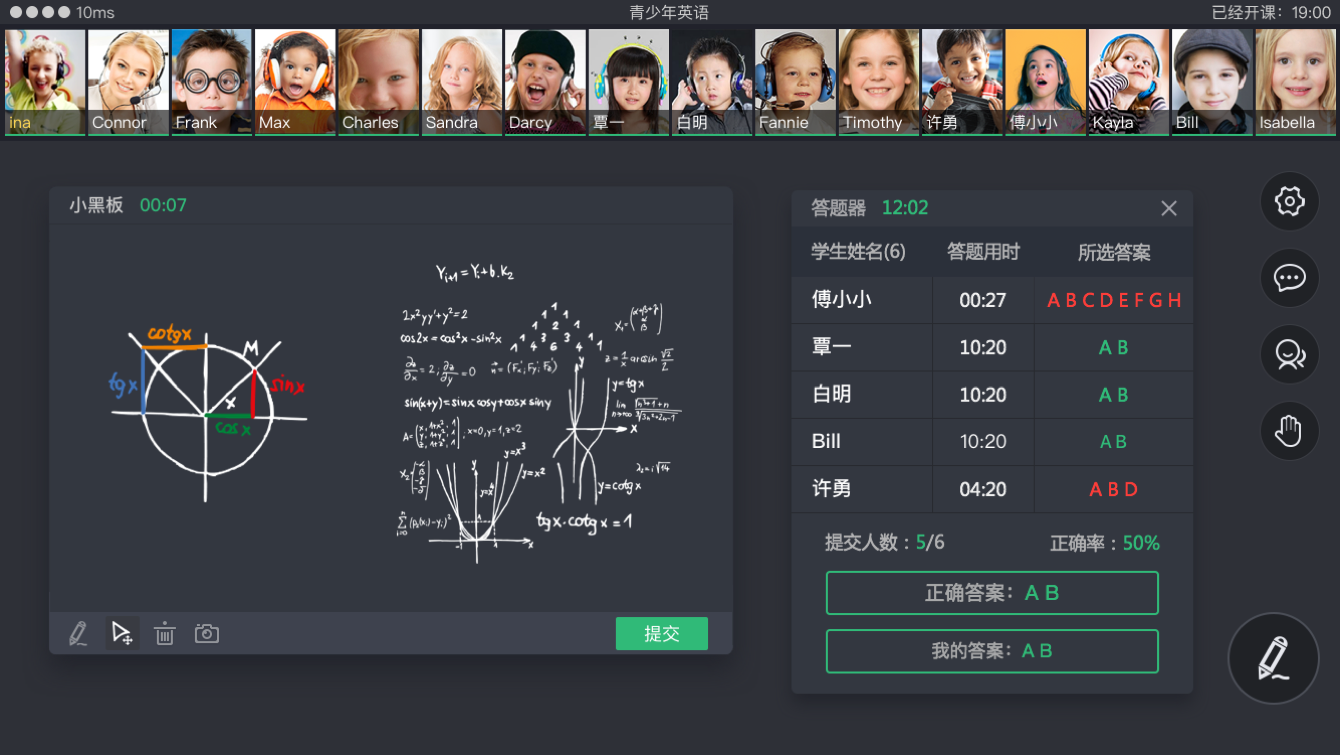
ClassIn classroom with blackboard and quiz tools: live interaction stays in the room; scheduling or booking through entry is linked in YunJiaoWu.

2. How each platform connects

With ClassIn, scheduling, booking, and follow-up stay in YunJiaoWu. Zoom, Tencent Meeting, Teams, and VooV hang meeting links on the timetable so people join by lesson.

1

ClassIn integration

Common for interactive foreign-teacher and live language classes. Accounts, courses, purchases, scheduling and booking, entry, cloud materials, attendance, homework/tests, and replays run in YunJiaoWu and sync to ClassIn; audio/video, blackboard, and in-class tools stay in the ClassIn classroom.

ClassIn
2

Zoom integration

Common for overseas teachers on meeting-style classes. The timetable carries the meeting entry so teachers and students join after cross-timezone scheduling without a second spreadsheet.

Zoom
3

Tencent Meeting integration

Common for domestic teachers and students. Hang a Tencent Meeting link on the timetable (including free plans) so learners join by lesson; use more automated meeting creation when volume grows.

Tencent Meeting
4

Teams integration

Common for overseas schools and corporate training on Microsoft Teams. Hang the meeting entry on the timetable so people join by lesson without splitting schedule and join links.

Teams
5

VooV integration

Tencent Meeting International (VooV Meeting) for overseas learners and cross-border teachers. Hang the meeting entry on the timetable and join by lesson, alongside domestic Tencent Meeting setups.

VooV
6

More

Beyond ClassIn, Zoom, Tencent Meeting, Teams, and VooV, we can extend other class entry options by volume and scenario—tell us if you need a new platform.

More

3. After class platforms connect, what moves into YunJiaoWu

Whether you connect ClassIn, Zoom, Tencent Meeting, Teams, or VooV, keep scheduling, booking, join entry, and lesson follow-up in YunJiaoWu. ClassIn can also sync accounts, purchases, attendance, materials, homework, and replays; the meeting platforms hang links on the timetable.

1

Teacher and student account sync

Create teachers and students in YunJiaoWu and they sync to ClassIn. Existing ClassIn accounts can bind automatically or be linked manually. Auditors and supervisors can follow each lesson too.

2

Scheduling, booking, and lessons

Use scheduling for fixed timetables and booking when learners pick open slots—both in YunJiaoWu. Purchases, course setup, and changes sync to ClassIn and auto-create the classroom so people join from the timetable.

3

Entry follows each lesson

Join links sit on the lesson and update when it changes or cancels; launch the ClassIn client into the room instead of digging old chat links.

4

Attendance and consumption

Match ClassIn room in/out for on-time, late, and early leave. Hours can deduct after a scheduled or booked lesson is created; purchased, scheduled, unscheduled, attended, and missed stay in YunJiaoWu.

5

Cloud drive and materials

Organize course and lesson files in YunJiaoWu, sync them into ClassIn folders, and open the right materials in class.

6

Homework, tests, follow-up

Assign, grade, and review progress in YunJiaoWu with sync; walk through items live inside the ClassIn classroom when needed.

7

Replays and classroom review

After class, ClassIn pushes the replay link to YunJiaoWu on the matching lesson record for review and quality checks.

8

Conflicts, changes, support

Catch schedule conflicts while planning; after a change, entry and rosters update together so support is not chasing two systems.

9

More

Live-class and admin capabilities keep expanding by school scenario. Tell us about a new platform or workflow and we can look at connecting it in YunJiaoWu.

5. FAQ

A few checks before you try it.

Q: After ClassIn is connected, do we still schedule or book daily in ClassIn admin?
A: Accounts, purchases, scheduling and booking, entry, attendance, materials, homework, and replays stay in YunJiaoWu with sync; teachers and students just log into ClassIn to teach and learn.
Q: Some campuses schedule; others let students book—can both connect?
A: Yes. Scheduling covers fixed timetables; booking lets learners pick open slots. Both lesson types can carry join entry and sync to ClassIn or meeting platforms.
Q: Which class platforms can we connect?
A: ClassIn, Zoom, Tencent Meeting, Teams, and VooV. ClassIn can sync admin actions; the others usually hang meeting links on the timetable.
Q: What if teachers and students already exist in ClassIn?
A: New accounts created in YunJiaoWu sync to ClassIn; existing ones can bind automatically or be linked manually.
Q: Do we need Tencent Meeting education APIs?
A: Not always. Hang a meeting link on the timetable (including free plans) to join by lesson; use more automated creation when volume grows.
Q: Does this help international schools?
A: Yes when an international track needs online classes with meeting or ClassIn entry; for course selection and GPA, see the international-school edition.

[EN] 6. 下一步

Tell us which platform you use most, whether you lean on scheduling or booking, and whether classes are 1:1, small-group, or live—then try through to join with real lessons.

4008-789-135 · support@momathink.com

WeChat consultation

WeChat Consultation

Online customer service

Online Consultation

Phone consultation

Phone Consultation

Free trial of YunJiaoWuTrial

Free Trial

WeChat consultation
WeChat Consultation
QQ consultation
QQ Consultation
Free Trial

Scan the QR code below to startWeChatconsultation

YunJiaoWu WeChat customer service QR codeClose